
Wordpress Plugins
How Does Wp NewsMaster Work? A Step-by-Step Guide to WordPress News Automation
Sep
How Does Wp NewsMaster Work? A Step-by-Step Guide to WordPress News Automation
Publishing news on WordPress can involve many small tasks.
First, you need to find new stories. Then you need to check the source, prepare the content, choose an image, optimize the post, and finally publish it.
Doing this occasionally is manageable.
Doing it every day across multiple news sources is much harder.
Wp NewsMaster is designed to make this process more organized by connecting these steps into an automated WordPress publishing workflow.
In this guide, we will look at how the process works from beginning to end.
The Basic Wp NewsMaster Workflow
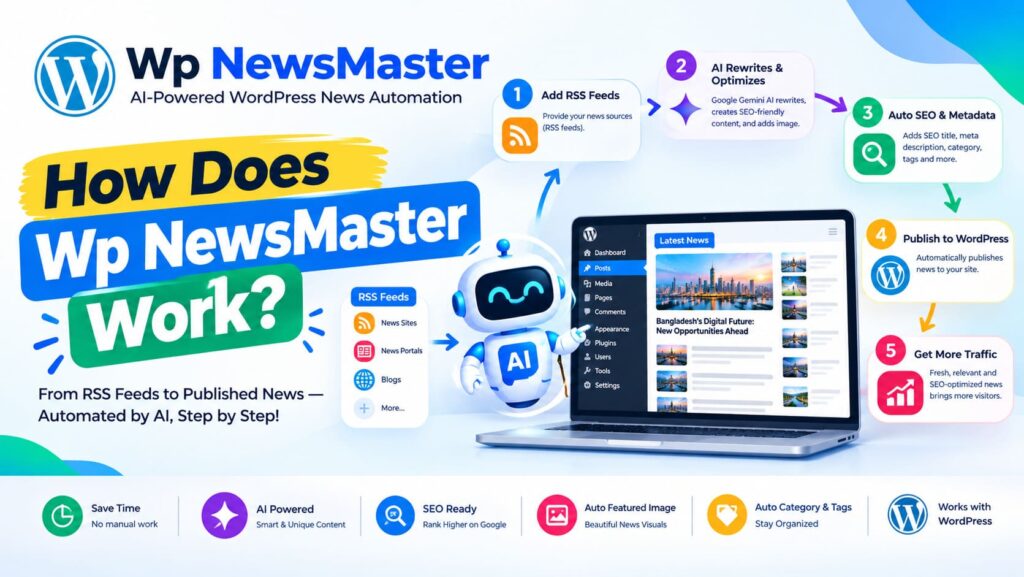
The easiest way to understand Wp NewsMaster is to look at the complete workflow:
News Sources → RSS Feeds → News Detection → Duplicate Check → AI Processing → Image Handling → SEO Preparation → WordPress → Publishing
Each step has a specific purpose.
Let’s go through them one by one.
Step 1: Add Your News Sources
The first step is choosing where your website will discover news.
Wp NewsMaster can work with RSS feeds from websites that provide them.
You should select sources that match the topic of your website.
For example:
- A technology website can use technology news sources.
- A sports website can use sports-related sources.
- A business website can monitor business and finance sources.
- An entertainment website can follow entertainment-related publications.
Source quality is important because your publishing workflow can only be as reliable as the information it receives.
Step 2: Wp NewsMaster Checks the Feeds
After your sources are configured, the plugin can check them for new content according to your publishing and scheduling settings.
When a new RSS item becomes available, the system can collect the information needed to process the story.
This saves you from manually visiting every source throughout the day.
Instead of checking multiple websites yourself, the system monitors the configured feeds as part of your automated workflow.
Step 3: The System Checks for Duplicate Stories
A common problem with automated news publishing is duplicate content.
The same event may be reported by several different websites.
For example, five RSS sources may publish their own reports about the same breaking news story.
If all five items were automatically published without checking, your website could end up with several very similar posts.
Wp NewsMaster includes duplicate-checking logic to help prevent unnecessary repeated publishing.
This makes the publishing workflow cleaner and helps reduce low-value duplicate posts.
Step 4: AI Processes the Article
Once a story passes the required checks, AI processing can be used according to your configured settings.
The purpose is not simply to copy an RSS article and publish it unchanged.
AI can help transform the available information into a more structured and readable article for your website.
Depending on your configuration, this can involve:
- Creating or improving a headline
- Organizing the article
- Rewriting information into a readable format
- Improving the overall flow
- Preparing supporting content
- Adapting content to your selected language
The exact result depends on the source material and the settings used.
Step 5: The Article Is Prepared for WordPress
After content processing, the system prepares the information needed for a WordPress post.
This may include:
- Article title
- Main content
- Categories
- Featured image
- Metadata
- SEO information
- Publication information
At this point, the incoming news story has moved from a simple RSS item toward a complete WordPress article.
Step 6: Images Are Handled
A news article normally needs a suitable image.
Wp NewsMaster can include image handling as part of the publishing workflow.
For websites that publish frequently, image storage can become an important technical consideration.
Instead of relying entirely on local WordPress hosting storage, supported external storage options can be used where configured.
This can help websites manage media more efficiently as the number of published articles grows.
Step 7: SEO Information Is Prepared
Before an article reaches the final publishing stage, SEO-related information can also be prepared.
A well-structured article can include information such as:
- SEO title
- Meta description
- Canonical URL
- Open Graph information
- Social sharing information
- Image metadata
- Article structured data
- NewsArticle structured data
- Published date
- Modified date
The purpose is to make the page easier for search engines and social platforms to understand.
However, adding SEO fields does not automatically make an article rank.
The content still needs to be useful, relevant, original enough to provide value, and written for people.
Step 8: The Post Is Sent to WordPress
Once the article has been prepared, Wp NewsMaster can create the post inside WordPress.
At this point, the article becomes part of your normal WordPress content system.
You can manage it through your WordPress dashboard just like other posts.
Depending on your configuration, the post may be:
- Published automatically
- Scheduled
- Saved for review
- Managed according to your selected publishing rules
This gives you flexibility over how much automation you want.
Step 9: Scheduling and Cron Keep the Workflow Running
Automation needs a mechanism to run regularly.
Wp NewsMaster uses scheduled tasks and cron-related functionality to keep the workflow moving.
For example, you might configure your website to check for new stories at regular intervals.
The exact schedule depends on your website, hosting environment, and configuration.
A properly configured cron system helps the plugin perform its background tasks without requiring you to manually start the process every time.
Step 10: License and Quota Management
Wp NewsMaster also uses a licensing and quota system to manage access to its publishing and AI-related features.
Your license determines what level of service is available to your website.
The system can track information such as:
- License status
- Website/domain
- Plan
- Usage
- Remaining quota
- Expiration
- Renewal information
This helps keep usage organized and gives the website owner visibility into the current license state.
What Happens When Everything Is Connected?
Once the major components are configured, the workflow can operate continuously.
A simplified example looks like this:
08:00 — A news source publishes a new story
↓
Wp NewsMaster detects the RSS item
↓
The system checks whether the story is already known
↓
The article is processed
↓
An image is prepared
↓
SEO information is generated or prepared
↓
The WordPress post is created
↓
Your publishing settings determine what happens next
The entire process can happen without requiring you to manually repeat every individual step.
Can You Still Review Articles Manually?
Yes.
Automation does not mean that every website needs to publish everything automatically.
Different publishers have different requirements.
Some websites may want fully automated publishing for selected sources.
Others may prefer to review articles before they go live.
A controlled workflow can be useful when accuracy and editorial review are especially important.
The best setup depends on the type of website you operate.
How to Set Up Wp NewsMaster
A new user can approach the setup in a simple order.
1. Install the Plugin
Install Wp NewsMaster on your WordPress website and activate it.
2. Activate Your License
Enter your license information and complete the activation process for your website.
3. Configure Your AI Settings
Choose the available AI model and configure the settings required for your content workflow.
4. Add RSS Sources
Add reliable RSS feeds that match the topics you want to publish.
5. Configure Content Settings
Set your preferred language, categories, content behavior, and other publishing options.
6. Configure Images
Choose how article images should be handled and configure supported storage options if you use external media storage.
7. Configure SEO
Review the available SEO settings and make sure your website’s SEO plugins and other site-level settings are compatible with your setup.
8. Configure Scheduling
Make sure WordPress cron or your preferred cron setup is working correctly.
9. Test the Workflow
Before enabling full automation, test the system with a small number of sources.
Check the generated articles, images, categories, SEO information, and publishing behavior.
10. Start Publishing
Once everything looks correct, enable your preferred automated workflow.
Starting with a small test is usually safer than immediately connecting a large number of sources.
A Good Setup Is More Important Than Maximum Automation
It can be tempting to add dozens of RSS feeds and publish as many articles as possible.
That is not necessarily a good strategy.
A better approach is to begin with a smaller number of reliable sources.
Monitor the results.
Check article quality.
Look for duplicate stories.
Review how images are handled.
Check search engine visibility.
Then gradually expand the workflow if the results are good.
Quality should come before volume.
What Should You Monitor?
Once Wp NewsMaster is running, it is useful to monitor several areas.
Content Quality
Read some published articles regularly.
Make sure they are understandable and useful.
Duplicate Detection
Check whether similar stories are being published multiple times.
Images
Make sure featured images are available and displayed correctly.
SEO
Check titles, descriptions, canonical URLs, structured data, and other important information.
Cron
Make sure scheduled tasks are actually running.
AI Usage
Monitor your quota and usage so that you understand how your available resources are being consumed.
Licensing
Keep an eye on your license status and expiration date.
Common Mistakes to Avoid
Adding Too Many Sources Immediately
More sources do not automatically mean a better website.
Start with sources that are genuinely useful to your audience.
Publishing Without Checking Quality
Automation should not become an excuse to ignore content quality.
Review your output regularly.
Ignoring Duplicate Content
Multiple sources may report the same story. Make sure your duplicate protection is configured properly.
Forgetting Cron Configuration
If scheduled tasks are not running correctly, the automated workflow may not behave as expected.
Treating SEO as a Ranking Guarantee
SEO tools can help search engines understand your pages, but they cannot guarantee rankings.
Useful content and a good website experience remain essential.
The Main Idea Behind Wp NewsMaster
The most important thing to understand is that Wp NewsMaster is not simply an RSS importer.
It is designed to connect multiple parts of the news publishing process into one workflow.
Instead of managing every step separately, you can create a system where news discovery, content processing, image handling, SEO preparation, and WordPress publishing work together.
That is what makes automation useful.
The objective is not to remove the publisher from the process.
The objective is to remove unnecessary repetitive work.
Final Thoughts
Wp NewsMaster works by turning a series of repetitive publishing tasks into a connected WordPress workflow.
It can start with an RSS feed, identify new stories, check for duplicates, process content with AI, prepare images and SEO information, and finally create or publish the article according to your settings.
The exact workflow depends on how the plugin is configured.
For the best results, start small, use reliable sources, test your settings, monitor the published content, and improve your workflow over time.
Good automation is not about publishing the largest number of articles.
It is about creating a reliable system that saves time while maintaining the quality your readers expect.
Let automation handle the routine work. Let your editorial standards guide the result.
